
The WordPress Landing Page Performance Checklist 2026
- The WordPress Landing Page Performance Checklist 2026
- Module 1: Define “Fast” for Ads (Your 2026 Scorecard)
- Module 2: Hosting Baseline (The Floor of Performance)
- Module 3: CDN + Edge Caching (Your Cheapest Win)
- Module 4: Page Builder Diet (Elementor vs. Bricks vs. Blocks)
- Module 5: Kill Render-Blocking (Unblock Your First Paint)
- Module 6: Fonts (The Silent Speed Killer)
- Module 7: Images & Video (The LCP Lifeline)
- Module 8: Database & Bloat Cleanup (WP Diet)
- Module 9: The Caching Stack (Layering for Speed)
- Module 10: Third-Party Scripts (The “Script Tax”)
- Module 11: Mobile-First Reality (Desktop is Irrelevant)
- Module 12: The Pre-Launch Performance Checklist
- Summary: Performance IS Profit
In 2026, speed isn’t a “nice-to-have.” It is your conversion rate.
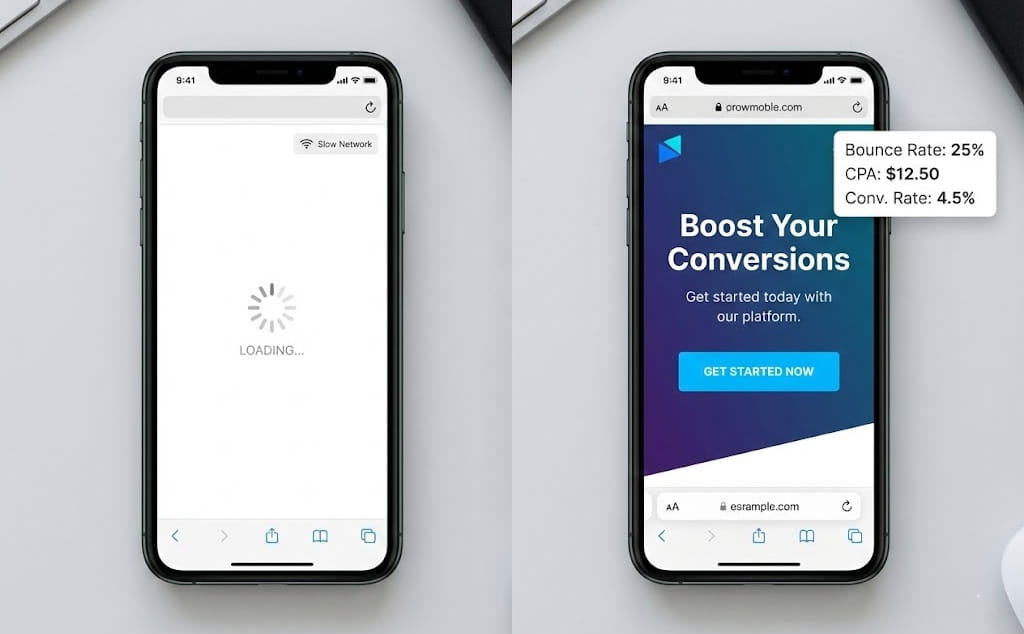
You can have the best hook, the most persuasive copy, and a killer offer. But if your landing page takes 4 seconds to load on a mobile device, your ad spend is burning before the user even sees your headline.
In the world of performance marketing—whether you are running Meta, TikTok, or Google Ads—latency is the enemy. Every millisecond of delay increases your bounce rate and signals to the ad algorithms that your destination URL is low quality. The result? Higher CPMs, lower quality scores, and a plummeting ROAS.
This guide is not for developers. It is for media buyers, affiliate marketers, and DTC founders using WordPress. We are going to strip away the engineering fluff and focus purely on the infrastructure changes that make you money.
Here is your 12-module checklist to bulletproof your WordPress landing pages for 2026.
Module 1: Define “Fast” for Ads (Your 2026 Scorecard)
What it is: Forget the vanity metrics. A 100/100 score on PageSpeed Insights doesn’t guarantee sales. For paid traffic, we care about Real User Metrics (RUM). In 2026, Google’s Core Web Vitals are the law of the land.
Why it matters for conversion: Ad platforms monitor how users interact with your page. If users bounce immediately (because the page feels slow or broken), the algorithm penalizes you.
The 3 Metrics That Pay the Bills:
- LCP (Largest Contentful Paint): How fast does the main hero image or headline appear?
- Goal: Under 2.5 seconds (ideally <1.5s).
- Ad Impact: This is your “Hook Retention.” If LCP is slow, they miss your hook.
- INP (Interaction to Next Paint): How fast does the page respond when they click “Add to Cart” or open an FAQ accordion?
- Goal: Under 200ms.
- Ad Impact: High INP frustrates users. Frustrated users don’t buy.
- CLS (Cumulative Layout Shift): Does the “Buy Now” button jump around while the page loads?
- Goal: 0.1 or less.
- Ad Impact: Visual stability builds trust. Janky pages look like scams.
Quick Test: Don’t just use Lab data. Check your Google Search Console “Core Web Vitals” report for field data. That is what real users (and Google) actually see.
Module 2: Hosting Baseline (The Floor of Performance)
What it is: The engine room of your landing page. In the WordPress ecosystem, hosting ranges from $3/month shared garbage to $500/month enterprise clusters.
Why it matters for conversion: You cannot optimize your way out of bad hosting. If the server takes 1 second just to “think” about sending the page (TTFB), you have already lost. For ads, you need high Concurrency—the ability to handle 500 clicks in 10 minutes without crashing.
Action Steps:
- Ditch Shared Hosting: If you are spending >$100/day on ads, get off GoDaddy, Bluehost, or HostGator shared plans.
- Look for “High Frequency” or “Premium Workers”: You need CPU power. Hosting that uses PHP 8.2+ and NVMe (storage) is non-negotiable in 2026.
- Managed WP vs. VPS:
- Managed (Kinsta/WP Engine): Great support, stability, but expensive scaling.
- Cloud VPS (Cloudways/Rocket.net): Better raw performance per dollar, handles spikes better.
Common Mistake: Launching a scaling campaign (e.g., $5k/day spend) on a server with only 2 PHP workers. The site will 502 Error, and you will lose thousands.
Module 3: CDN + Edge Caching (Your Cheapest Win)
What it is: A Content Delivery Network (CDN) stores your images and scripts on servers globally (the “Edge”), so a user in London downloads files from London, not your server in New York.
Why it matters for conversion: It reduces latency. But for WP landing pages, Full Page Caching at the Edge (like Cloudflare APO) is the game changer. It turns your dynamic WP page into a static HTML file that loads instantly.
Action Steps:
- Use Cloudflare Enterprise or APO: Many premium hosts (Rocket.net, Kinsta) integrate this by default. If not, buy Cloudflare APO ($5/mo).
- Configure Cache Rules: Ensure your landing pages are cached, but your Checkout and Thank You pages are NOT.
The “Ad Tracking” Pitfall:
- Common Mistake: Aggressive caching that strips URL parameters.
- The Fix: Ensure your caching configuration is set to “Ignore Query Strings” or specifically whitelists ad parameters like
fbclid,gclid,utm_source, andutm_medium. If you cache the page for the first user, and the second user gets that cached version without their unique click ID, your tracking pixel will fail to attribute the sale.
Module 4: Page Builder Diet (Elementor vs. Bricks vs. Blocks)
What it is: The tool you use to design the page. In 2026, the battle is between “Ease of Use” and “Code Bloat.”
Why it matters for conversion: Page builders inject massive amounts of CSS and DOM elements (divs inside divs inside divs). This bloats the page size and hurts LCP.
The Hierarchy of Speed:
- Hardcoded / Gutenberg (Block Themes): The fastest. Native to WP.
- Bricks Builder / Breakdance: The modern standard. Clean code, high performance.
- Elementor / Divi: The heaviest. Requires aggressive optimization to run fast.
Action Steps:
- If using Elementor: Enable all internal “Experiments” (Flexbox containers, Optimized DOM output). Use the “Hello” theme.
- The Strategy: Do not use 15 different widgets (sliders, carousels, maps) on a landing page. Keep the design simple. A static image converts better than a heavy slider 99% of the time.
Common Mistake: Installing “Add-on packs” for your page builder. These often load huge CSS files on every page, even if you aren’t using the widgets.
Module 5: Kill Render-Blocking (Unblock Your First Paint)
What it is: When a browser loads your page, it pauses every time it hits a CSS or JS file to download and read it. This “blocks” the visual rendering of the page.
Why it matters for conversion: If the browser is busy reading a “Contact Form” script, it can’t show your Headline. The user sees a white screen. White screens = Bounce.
Action Steps:
- Generate Critical CSS: Use a plugin (WP Rocket, FlyingPress, or Perfmatters) to identify the CSS needed only for the top of the page. Inline this in the HTML.
- Defer or Delay JS:
- Defer: Load JS in the background.
- Delay: Do not load JS until the user interacts (scrolls/clicks). This is a magic bullet for heavy pages.
- Remove Unused CSS: Scan your site and strip out style sheets from plugins that aren’t active on the landing page.
Quick Test: Open Chrome DevTools -> Coverage tab. Run a scan. If you see 90% “Unused Bytes” in red, you have a render-blocking problem.
Module 6: Fonts (The Silent Speed Killer)
What it is: Web fonts (Google Fonts, Adobe Fonts) that need to be downloaded before text appears.
Why it matters for conversion: FOUT (Flash of Unstyled Text) or FOIT (Flash of Invisible Text). If users can’t read your headline instantly, they leave. Furthermore, loading fonts from external servers (like fonts.googleapis.com) adds DNS lookups.
Action Steps:
- Host Locally: Download your fonts and serve them from your own domain. Most optimization plugins do this automatically now.
- Limit Weights: Do you really need “Thin,” “Medium,” “Semi-Bold,” “Bold,” and “Black”? No. Stick to Regular (400) and Bold (700).
- Preload: Tell the browser to load your headline font immediately.
- Display Swap: Ensure
font-display:swap; is in your CSS. This shows a fallback system font immediately so the text is visible while the custom font loads.
Common Mistake: Using a different font family for every header and body text. It destroys consistency and performance.
Module 7: Images & Video (The LCP Lifeline)
What it is: Visual media is usually the heaviest part of a landing page. It is also usually the Largest Contentful Paint (LCP) element.
Why it matters for conversion: High-res product shots sell, but pixelated or slow-loading images kill desire.
Action Steps:
- Modern Formats: Convert everything to AVIF or WebP. AVIF is the 2026 standard—smaller file size, better quality.
- Explicit Dimensions: Always set
widthandheightattributes to prevent layout shifts (CLS). - Hero Image Handling: NEVER lazy-load your hero image. This is the most common error. The hero image must load immediately (eager load) or be preloaded. Lazy load everything below the fold.
- Video Strategy:
- Avoid YouTube/Vimeo embeds in the hero section (they load heavy player scripts).
- Use a self-hosted MP4/WebM, compressed heavily, with no audio.
- Better yet: Use a lightweight JPG “Poster” image with a play button. Load the video only when clicked.
Module 8: Database & Bloat Cleanup (WP Diet)
What it is: Over time, WordPress databases get clogged with post revisions, spam comments, and expired transients (temporary data).
Why it matters for conversion: A bloated database slows down backend queries. This increases TTFB (Time To First Byte), making the server sluggish to respond to the initial request.
Action Steps:
- Limit Revisions: Add
define( 'WP_POST_REVISIONS', 5 );to yourwp-config.phpfile. You don’t need 100 versions of your landing page saved. - Clean Transients: Use a plugin like WP-Optimize or Advanced Database Cleaner to sweep the database weekly.
- Autoloaded Options: Check your
wp_optionstable. If “autoloaded data” is over 1MB, you have plugins slowing down every single page load.
Mindset Shift: Treat your ad landing page installation like a race car, not a family van. Strip out everything that isn’t essential for the race.
Module 9: The Caching Stack (Layering for Speed)
What it is: Caching isn’t just one button. It’s a stack of technologies working together.
Why it matters for conversion: Proper caching reduces server load, allowing you to handle more ad traffic with a cheaper server.
The Ideal Stack:
- Page Caching: Saves the HTML output. (Handled by plugins like FlyingPress/WP Rocket).
- Object Caching: Stores database query results. Redis is the standard in 2026. Ask your host if Redis is enabled.
- Opcode Caching: Stores compiled PHP code. (Standard on good hosts).
Advertiser Note: Ensure your caching plugin is compatible with your WooCommerce or cart setup. You never want to cache the cart/checkout page, or Customer A will see Customer B’s items.
Module 10: Third-Party Scripts (The “Script Tax”)
What it is: Pixels, Chat widgets, Heatmaps (Hotjar), Reviews (Yotpo/Loox), Countdowns, Social Proof popups.
Why it matters for conversion: This is the #1 cause of slow landing pages for marketers. Every script you add forces the user’s browser to download and execute code from another server. This kills INP (responsiveness).
The “Script Budget” Rule: “Every script must pay rent.” If a script doesn’t directly contribute to profit (e.g., the Meta Pixel), cut it.
Action Steps:
- Delay Execution: Use your optimization plugin to “Delay” non-essential scripts (Reviews, Chat bots) until user interaction. The page loads visually first; the chat widget appears 3 seconds later.
- Google Tag Manager (GTM): Consolidate tags in GTM, but don’t just dump them all there. Use triggers to fire tags only on pages where they are needed.
- Server-Side Tracking: Move tracking logic to the server (CAPI) where possible to reduce browser load.
Module 11: Mobile-First Reality (Desktop is Irrelevant)
What it is: Designing and optimizing for the mobile viewport (360px – 420px width) first, desktop second.
Why it matters for conversion: If you run ads on TikTok, IG Reels, or FB Feed, 95%+ of your traffic is mobile. Desktop speed is a vanity metric.
Action Steps:
- Touch Targets: Ensure buttons are at least 44px tall. Frustrated thumbs don’t convert (impacts INP).
- Fold Discipline: On mobile, screen real estate is expensive. Don’t waste the top 600px with a massive menu or empty space. Get to the Headline + Hero + CTA immediately.
- Hide Heavy Elements: Use CSS to hide complex sliders or heavy background videos on mobile devices. Show a static image instead.
Module 12: The Pre-Launch Performance Checklist
Before you turn on the ads, copy/paste this list. If you can’t check these boxes, you aren’t ready.
- [ ] TTFB: Under 200ms in target region?
- [ ] LCP: Hero element loads under 2.5s on 4G?
- [ ] CLS: No layout shifting when loading?
- [ ] Hero Image: Preloaded and excluded from lazy-load?
- [ ] Formats: Images converted to AVIF/WebP?
- [ ] Caching: Page Cache & Redis enabled?
- [ ] CDN: Active and serving assets?
- [ ] Parameters: UTM/ClickIDs whitelisted in cache?
- [ ] Scripts: Non-critical JS delayed?
- [ ] Mobile: Tested on an actual phone (not just browser resize)?
- [ ] Backup: Fresh backup saved locally?
Optimization ROI
| Optimization | Metric Impacted | Why Advertisers Care |
|---|---|---|
| Critical CSS | LCP (Visual Load) | Users see the headline instantly. Bounce rate drops. |
| Delay JS | INP (Interactivity) | The page feels “alive.” Buttons work instantly. |
| Edge Caching | TTFB (Server Response) | Lower CPC due to better Landing Page Experience scores. |
| AVIF Images | LCP & Bandwidth | Faster load on slow mobile data (4G/LTE). |
The “Silent Killers” of Ad Performance
| Common Mistake | Symptom | The Fix |
|---|---|---|
| Too many plugins | High TTFB, Admin lag | Audit and remove; replace with code snippets where possible. |
| Lazy-loading Hero | Slow LCP, White flash | Exclude top 2-3 images from lazy load. |
| Uncapped Reviews | Page jumps (CLS) | Set fixed height for review widgets; load via “Show More”. |
| Aggressive Caching | Tracking/UTMs lost | Whitelist query strings (fbclid, gclid) in cache rules. |
Summary: Performance IS Profit
In 2026, the digital ad market is a war for attention. You are fighting against competitors, short attention spans, and expensive CPMs.
Your landing page infrastructure is the only variable you fully control.
Infrastructure is the cheapest place to buy conversion rate. You can spend weeks testing new ad creatives to get a 10% lift. Or, you can optimize your LCP and Script loading in an afternoon and potentially see a 20% lift in conversion rate simply because people stop bouncing.
Treat your website performance with the same discipline you treat your ad budget. Optimize it. Monitor it. Scale it.