
The Marketer’s Tech Stack: How to Choose Domains, Hosting, CDNs, and Caching for High-Converting Campaigns
- The Marketer’s Tech Stack: How to Choose Domains, Hosting, CDNs, and Caching for High-Converting Campaigns
- Part 1: Domains & DNS – The Foundation of Trust and Tracking
- Part 2: Hosting – The Engine of Your Campaign
- Part 3: CDN – Your Global Distribution Center
- Part 4: Caching – The Shock Absorber for Traffic
- Part 5: Pick Your Stack by Scenario
- Part 6: The “Copy/Paste” Launch Checklist
Your campaign page stack isn’t a tech decision—it’s a conversion decision.
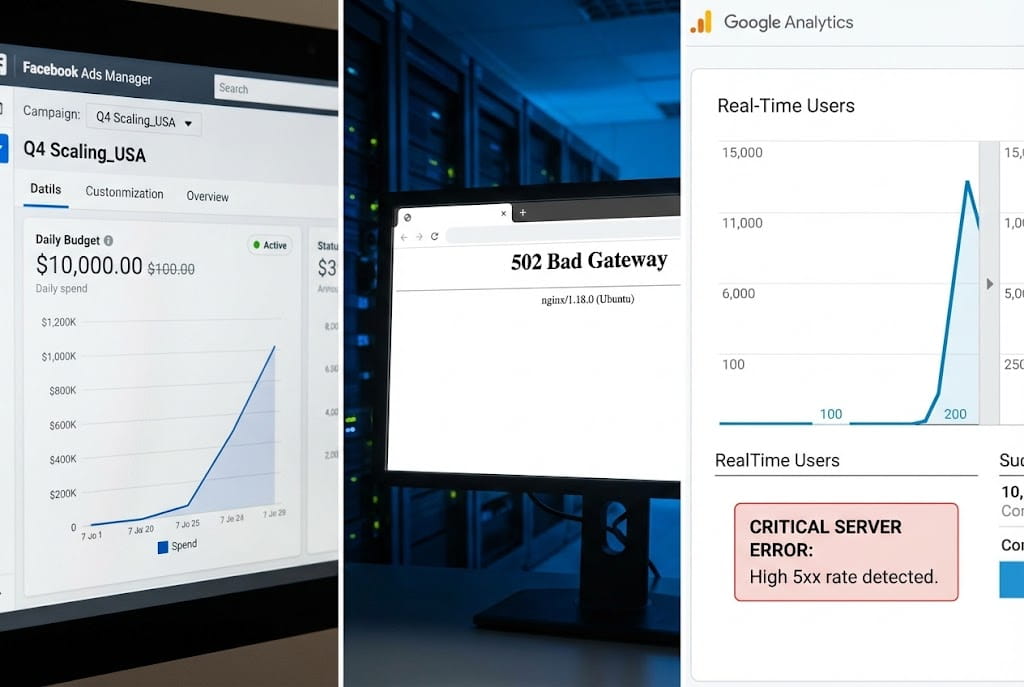
Picture this scenario: You have spent weeks perfecting your creative. The hook rate is amazing. The CTR is climbing. You decide to scale the budget from $500/day to $5,000/day.
Suddenly, your ROAS (Return on Ad Spend) falls off a cliff.
You blame the algorithm. You blame creative fatigue. You blame the audience targeting.
But the real culprit is silent. It’s your server choking on concurrent connections. It’s your DNS taking 400ms too long to resolve. It’s your caching plugin stripping the UTM parameters, making your tracking pixel blind.
In the high-stakes world of paid traffic, infrastructure is the invisible ceiling on your performance.
- Speed = Lower bounce rates and cheaper CPAs.
- Stability = Preventing the dreaded 502 Bad Gateway error during traffic spikes.
- Tracking = Feeding the ad algorithm accurate data so it can find you more customers.
- Trust = Ensuring the user feels safe entering their credit card information.
This guide is not for developers. It is for marketers, media buyers, and affiliate pros who need to know exactly how to build a foundation that can handle scale.
We are going to break down the four pillars of a campaign-ready infrastructure: Domains, Hosting, CDNs, and Caching.
Part 1: Domains & DNS – The Foundation of Trust and Tracking
Your domain strategy is the front door of your funnel. If the door is jammed (DNS issues) or looks sketchy (bad domain choice), no one is coming in.
1. Brand Domain vs. Campaign Domain
The first decision you face is structural: Do you launch on your main website or a separate URL?
The “Safe” Play: Subdomains For 90% of campaigns, the best practice is to use a subdomain of your main brand.
- Example:
offer.yourbrand.com,shop.yourbrand.com, ortry.yourbrand.com.
Why Marketers Love Subdomains:
- Trust Inheritance: Users already recognize your main brand. They are more likely to fill out a form or complete a purchase if the URL looks familiar.
- Pixel Preservation: This is critical in the post-iOS14 world. Using a subdomain allows you to share first-party cookies across your entire ecosystem. If you send traffic to a completely new domain, your pixel treats those users as strangers.
- Unified Management: You can verify the domain once in Facebook Business Manager and use it across multiple funnels without verifying new domains every week.
When to Use a Separate “Vanity” Domain: Sometimes, you should buy a new URL (e.g., BestKetoSupplement.com).
- Aggressive Direct Response: If the offer is “edgy” or might risk flagging your main domain, isolate it.
- Split Testing Brands: If you are testing a new angle that conflicts with your main brand voice.
- Affiliate Marketing: If you don’t own the product, you obviously cannot use the brand domain.
2. The “Red Flags” of Domain Selection
When buying a domain for ads, avoid these conversion killers:
- The “Spam” Look: Avoid hyphens (
get-best-offer-now.com) and cheap TLDs (Top Level Domains) like.xyz,.info, or.biz. They scream “scam” to users and trigger ad review bots. Stick to.comor.co. - The “Too Long” URL: On mobile, your URL bar is tiny. Long domains get truncated. Keep it short and punchy.
- The Redirect Chain: Never use a domain just to forward (301 redirect) traffic to another domain. This slows down the load time and strips tracking parameters (GCLID/FBCLID), killing your attribution.
3. DNS: The Silent Performance Killer
Domain Name System (DNS) is the phonebook of the internet. When a user clicks your ad, the browser asks the DNS where your website lives.
What Marketers Need to Know:
- Stability is Non-Negotiable: If your DNS provider goes down, your site effectively vanishes. Use enterprise-grade DNS like Cloudflare or AWS Route53. Avoid the free DNS provided by cheap registrars like GoDaddy or Namecheap; they are often slower and less reliable.
- TTL (Time To Live) Strategy: TTL tells the internet how long to cache your DNS records.
- Standard Mode: High TTL (24 hours). Good for stability.
- Campaign Mode: Before a big launch or migration, lower your TTL to 5 minutes (300 seconds).
- Why? If your server crashes during a launch, a low TTL allows you to point your domain to a backup server almost instantly. If your TTL is 24 hours, you are dead in the water for a full day.
Domain Setup Checklist:
- [ ] Use a clean subdomain (
go.brand.com) for tracking continuity. - [ ] Force HTTPS (SSL) on all pages. “Not Secure” warnings kill conversion.
- [ ] Use a premium DNS provider (Cloudflare is the industry standard).
- [ ] Verify the domain in your Ad Manager before you spend money.
Part 2: Hosting – The Engine of Your Campaign
This is where most campaigns fail. You buy cheap hosting, the ad goes viral, traffic spikes, and the server crashes (Error 502).
If your host can’t handle a spike, your ad account is the one that pays the bill.
1. The Three Questions You Must Ask
Before choosing a host, audit your needs:
- What is the tech stack? Are you using WordPress/WooCommerce, or is it a static HTML/Next.js landing page?
- What is the traffic profile? Is it slow and steady (SEO traffic) or explosive spikes (Paid Ads/Email drops)?
- What is the team’s capability? Do you have a developer who can manage a server, or do you need a “done-for-you” solution?
2. Hosting Tiers: Choosing the Right Tool
Don’t get bogged down in specs. Look at the Use Case:
Option A: Managed WordPress (The Marketer’s Favorite)
- Providers: Kinsta, WP Engine, Rocket.net.
- Best For: Teams running heavy WordPress sites who want peace of mind.
- Why: They handle caching, security, and updates. They are optimized for PHP performance.
- The “Ad” Benefit: They usually have “elastic scaling.” If you get a traffic spike, they won’t shut you down; they will serve the traffic and charge you a small overage fee. This is worth every penny.
Option B: VPS / Cloud (The Power Player)
- Providers: DigitalOcean, Vultr, Cloudways.
- Best For: High-volume affiliates and tech-savvy teams.
- Why: You get dedicated resources (CPU/RAM). No “noisy neighbors” slowing you down.
- The “Ad” Benefit: Massive concurrency handling. A properly tuned VPS can handle 10x the traffic of shared hosting for the same price.
Option C: Static / Serverless (The Speed Demon)
- Providers: Vercel, Netlify, AWS S3.
- Best For: Pure landing pages (HTML/JS) with no backend database.
- Why: There is no database to query. The page loads instantly. It is virtually un-crashable.
- The “Ad” Benefit: The lowest possible TTFB (Time to First Byte). This is the gold standard for “Direct Response” landing pages.
Option D: SaaS Funnels (The Easy Button)
- Providers: Shopify, ClickFunnels, Unbounce.
- Best For: Solo marketers who need speed of implementation.
- Why: They handle the hosting. You focus on the offer.
- The Trade-off: You have less control over performance optimization. If Shopify is slow today, you are slow today.
3. What to Look For (The “No Fluff” Metrics)
- TTFB (Time to First Byte): This needs to be stable. It’s easy to be fast when 1 person is on the site. Can the host keep TTFB under 200ms when 500 people are clicking your ad at the same time?
- Concurrency: Ask the host: “How many PHP workers do I get?” (For WordPress). More workers = more simultaneous visitors.
- Backups: You need hourly backups during a heavy campaign, not daily. If you break the site while editing the offer, you need a “Time Machine” button to rollback instantly.
A Marketer’s Mindset: Treat hosting as part of your Media Cost, not your IT budget. If upgrading from a $20/month host to a $200/month host improves your Conversion Rate (CVR) by just 0.3%, it will pay for itself in one day of spending. Don’t step over dollars to pick up pennies.
Part 3: CDN – Your Global Distribution Center
A Content Delivery Network (CDN) is not optional in 2026. It is the cheapest performance upgrade you can buy.
1. What a CDN Actually Does
Imagine your server is a pizza shop in New York.
- Without CDN: A customer in London orders pizza. You have to bake it in NY and fly it to London. It arrives cold and late.
- With CDN: You have “delivery hubs” in London, Tokyo, and Sydney. When a customer orders, the hub delivers a pre-made pizza from down the street. Instant gratification.
2. The 4 Criteria for Choosing a CDN
- PoP (Point of Presence) Density: Does the CDN have servers in the countries you are targeting? If you are running ads in Brazil, you need a CDN with nodes in São Paulo, not just Miami.
- Cache Purge Speed: When you update your headline or swap an image, how fast does the CDN update? It should be instant. If you have to wait 15 minutes for changes to show, your A/B testing will be a nightmare.
- Security (WAF): A good CDN (like Cloudflare) acts as a shield. It blocks bots, DDoS attacks, and scrapers before they even hit your server. This saves your server resources for real humans who click your ads.
- Integration: How easily does it talk to your host? (e.g., Rocket.net has Cloudflare Enterprise built-in).
3. The “Tracking Killer” Trap
Here is the most common mistake marketers make with CDNs: Stripping Parameters.
- Ad platforms append data to your URL:
?fbclid=xyz,?utm_source=meta. - Some CDNs are configured to treat every URL with a different parameter as a “new page” and refuse to cache it (slowing down the site).
- Other CDNs aggressively strip these parameters to force caching (breaking your tracking).
The Solution: Configure your CDN to “Cache Everything” but “Ignore Query Strings” for caching purposes, while passing them through to the browser so your Pixel can read them.
Pro Tip: Cloudflare is the default winner here. Their “Page Rules” allow granular control that marketers need.
Part 4: Caching – The Shock Absorber for Traffic
Caching is the difference between your server crashing or coasting. It is the layer that memorizes your page so the server doesn’t have to build it from scratch for every visitor.
1. The 4 Layers of Caching
Marketers only need to understand these four:
- Browser Cache: Files saved on the user’s phone. (Great for repeat visitors).
- CDN / Edge Cache: The page is saved at the CDN node. (The fastest delivery method).
- Page Cache (Server): The server saves a static HTML file of your page.
- Object Cache (Database): Saves the results of database queries (vital for dynamic carts).
2. The Campaign Page Strategy
For a dedicated landing page, your goal is Aggressive Caching. You want the page to be essentially “Static.”
- WP Strategy: Enable Page Cache + CDN Cache.
- HTML Strategy: Cache everything at the Edge.
3. The “No-Go Zones” (Where Caching Kills Revenue)
You must exclude certain pages from caching, or you will lose money.
- Checkout Page: Never cache this. User A will see User B’s credit card info.
- Cart Page: Needs to be dynamic to show the correct items.
- Order Confirmation: Must be unique to the transaction.
- Dynamic Pricing: If you are using geo-location to change currency, aggressive caching might show Dollars to a user in Europe.
4. The Caching “Sanity Check”
Before launching ads, run this test:
- Open the page in a new browser.
- Add a random parameter to the URL:
/?test=123. - Does the page load?
- Does the parameter stay in the URL bar? (Crucial for UTMs).
- Change a headline in your editor. Clear cache.
- Does the new headline appear instantly in an Incognito window?
If you fail any of these, your caching configuration is broken.
Part 5: Pick Your Stack by Scenario
Different campaigns require different infrastructure. Here are the recommended stacks for 2026.
Scenario A: The “Lead Gen” Funnel (Meta/Google)
- Goal: Capture emails or leads.
- The Stack: Subdomain + Managed WordPress + Cloudflare APO.
- Why: You need the flexibility of WordPress to build forms and iterate copy quickly, but the speed of Cloudflare’s Edge Caching to keep CPAs low.
Scenario B: The High-Volume Affiliate
- Goal: Arbitrage traffic. Maximum speed, minimum cost.
- The Stack: Static HTML Landing Page + AWS S3 + Cloudfront (or Vercel).
- Why: You don’t need a backend database. You need a page that loads in 100ms globally. This stack is “un-crashable” even if you send 50,000 clicks in an hour.
Scenario C: The E-commerce Event (Shopify)
- Goal: Sales during a product drop.
- The Stack: Shopify Plus + Image Optimization Apps.
- Why: You can’t change Shopify’s hosting, so you focus on what you can control: compressing images and minimizing third-party scripts (apps) that slow down the render time.
Scenario D: Global Brand Awareness
- Goal: Reach users in US, Europe, and Asia simultaneously.
- The Stack: Enterprise Hosting (e.g., Kinsta/WP Engine) + Enterprise CDN (Cloudflare).
- Why: You need “Edge Localization.” The CDN ensures the German user hits a Frankfurt server and the Japanese user hits a Tokyo server.
Part 6: The “Copy/Paste” Launch Checklist
Do not turn on your ads until you have verified every item on this list.
Domain & DNS
- [ ] Using a clean subdomain (e.g.,
try.brand.com) to preserve Pixel data. - [ ] SSL (HTTPS) is forced on all pages. No “Mixed Content” warnings.
- [ ] DNS is managed by a premium provider (Cloudflare/AWS).
- [ ] TTL Strategy: Lowered to 5 minutes if you anticipate needing to switch IPs quickly.
Hosting & Server
- [ ] Load Test: Verified that TTFB stays under 200ms during a traffic spike.
- [ ] Backups: Automated hourly backups enabled? Do you know how to restore one in 1 click?
- [ ] Uptime Monitoring: Set up alerts (UptimeRobot) to text you if the site goes down.
- [ ] PHP Workers: Do you have enough for your traffic volume? (Ask your host).
CDN & Security
- [ ] CDN is active and serving assets (Inspect Element -> Network -> Look for CDN headers).
- [ ] WAF (Firewall) is on to block bad bots from draining ad budget.
- [ ] “Under Attack” mode is ready to be toggled if needed.
Caching & Tracking
- [ ] Page Cache is ENABLED for landing pages.
- [ ] Page Cache is EXCLUDED for Checkout/Cart/Thank You pages.
- [ ] UTM Safety: Verified that URL parameters (UTMs, fblcid) are NOT being stripped by the cache.
- [ ] Purge: Verified that clicking “Purge Cache” actually updates the live site instantly.
Final Thought
Infrastructure is the budget multiplier. A fast, stable infrastructure makes every dollar of ad spend work harder. A slow, fragile infrastructure taxes every single impression.
In 2026, the technology is available and affordable. There is no excuse for a slow site. Build